Diving into a Wikipedia rabbit hole is one of life’s simple pleasures—until you’re 20 tabs deep trying to piece together the chronology of World War II, the Renaissance, or the rise of a tech giant. Those articles are goldmines of information, but they’re often walls of text that make it hard to grasp the big-picture sequence of events. Enter WikiTimeline, a clever free web tool that automatically transforms any Wikipedia article into an interactive, visual timeline. Powered by AI, it scans the page, pulls out dated events, and lays them out in a clean, scrollable format that’s perfect for quick overviews or deeper exploration.
Whether you’re a student cramming for a history exam, a researcher spotting connections, or just a curious browser who wants to see how events overlap, WikiTimeline makes Wikipedia’s knowledge more digestible. And the killer feature? You can compare multiple articles side-by-side to visualize rivalries, parallel histories, or cause-and-effect across topics.
What Is WikiTimeline?
WikiTimeline (available at wiki-timeline.com) is a straightforward web app that uses large language models—like Google Gemini—to extract chronological events from Wikipedia articles and turn them into beautiful, interactive timelines. Launched in early 2025, it’s designed for anyone who loves history but hates manually charting dates.
No downloads, no sign-up required for basic use—just paste a Wikipedia URL or search for a topic, and it generates the timeline in seconds. It supports thousands of articles across multiple languages, and there’s a curated gallery of popular ones to browse right away.
Here’s a glimpse of what a generated timeline looks like—this one from the “History of Antarctica” article:
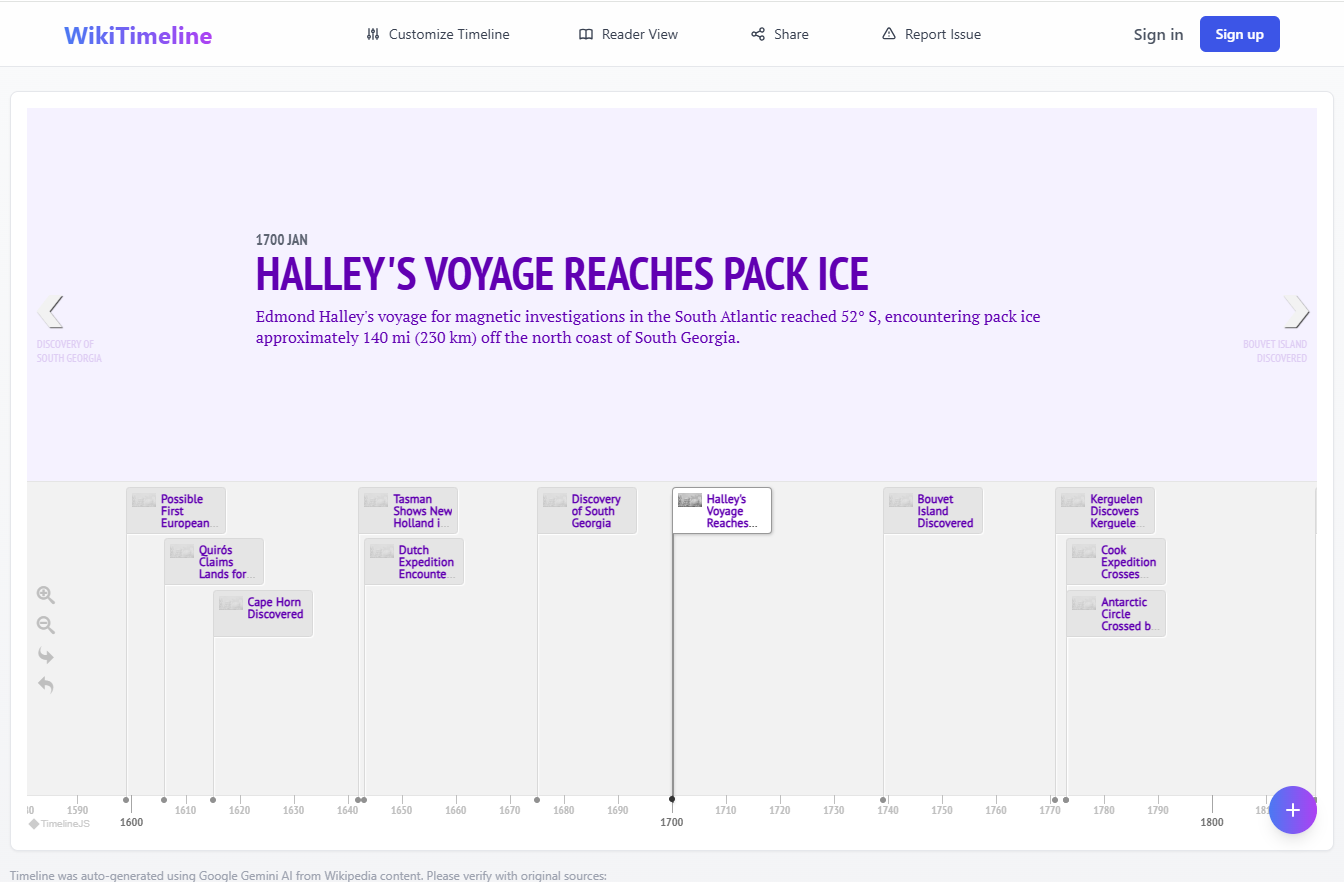
And an example of a single-event deep dive in an exploration timeline:

Key Features That Make WikiTimeline Shine
What sets it apart from just reading the article? Here’s the breakdown:
- Instant Generation: Enter a Wikipedia title or URL, and AI does the heavy lifting—identifying dates and events automatically.
- Interactive Navigation: Zoom in/out, scroll with arrows, and click events for summaries. Dense periods cluster smartly, expanding as you zoom.
- Comparisons: Add multiple articles for side-by-side views. Perfect for rivalries like Edison vs. Tesla, or Gates vs. Jobs.
This comparative view of two hockey teams shows how overlaps pop visually:

- Customization: Tweak fonts, color schemes (from vibrant pastels to monochrome), and more.

This Tool Turns Any Wikipedia Topic Into an Interactive Timeline …
- Sharing & Embedding: Unique URLs for sharing, plus embed code for blogs or sites.
- Gallery & Collections: Pre-made timelines for scientists, inventors, artists, and more—great starting points.
- Reader View: Clean, distraction-free mode for mobile or focused browsing.
It’s free to use, with optional sign-in for perks like ad-free experience and upcoming features (saving favorites, custom timelines).
How to Get Started with WikiTimeline
It’s ridiculously simple—no learning curve here:
- Head to the Site: Go to wiki-timeline.com.
- Search or Paste: Type a topic (e.g., “Albert Einstein”) or paste a full Wikipedia URL.
- Generate: Hit enter, and watch the timeline build.
- Explore: Scroll, zoom, click events. Add more articles via the search bar for comparisons.
- Customize & Share: Adjust visuals, then copy the link or embed code.
- Browse the Gallery: Check out ready-made ones at wiki-timeline.com/gallery for inspiration.
Pro tip: Start with biographical articles—they often have the richest date info for stunning results.
Lifehacker Tips for Getting the Most Out of It
To supercharge your sessions:
- Spot Historical Connections: Compare overlapping lives or events. Try “World War I” with “Spanish Flu” to see pandemic timing, or Renaissance artists for creative rivalries.
- Study Smarter: Use as a visual study aid—timelines help retention way better than plain text. Export shares to notes apps.
- Verify Everything: AI can miss nuances or hallucinate slightly, so always cross-check with the original Wikipedia page.
- Go Broad or Narrow: Works best on event-heavy articles (history, biographies, wars). Less ideal for abstract topics like philosophy.
- Combine with Tools: Embed in Notion or Google Docs for personal wikis, or pair with Wikipedia’s own lists for deeper dives.
Pros, Cons, and Alternatives
Pros:
- Completely free and instant.
- Killer comparison feature for contextual insights.
- Clean, interactive design that’s mobile-friendly.
- Huge library potential—any public Wikipedia article works.
Cons:
- AI-dependent, so occasional inaccuracies or missed events.
- No offline mode.
- Premium features (like saving) are still rolling out.
If WikiTimeline doesn’t fit, try these alternatives:
- ClassTools Wikipedia Timeline Generator: Older but solid—generates editable timelines directly from searches.
- TimelineJS: Open-source powerhouse for custom timelines (manual entry, but integrates media richly).
- Manual Wikipedia templates like Graphical Timeline for embedding in articles.
For more advanced needs, tools like Preceden or Timepath offer paid features for fully custom builds.
Why WikiTimeline Is a Wikipedia Game-Changer
In an era of information overload, WikiTimeline turns Wikipedia’s depth into at-a-glance clarity. It’s not a replacement for reading the full article—it’s the perfect companion to make sense of complex histories faster. Whether mapping out a person’s life, comparing eras, or just satisfying curiosity, it brings events to life in a way static text never could.
Head over to wiki-timeline.com and try it with your favorite topic. You’ll wonder how you ever Wikipediated without it. Happy timelining!