If you’ve ever stared at a foreign menu, a street sign, or product packaging wondering “what does this actually say?,” your iPhone can answer that question in real time. Starting with iOS 16, Apple deeply integrated translation into the Camera app and the built‑in Translate app, so you can point your camera at printed text and see an instant translation overlaid on the screen. You no longer need to snap a photo, open a separate app, copy‑paste, and tap twice: the system detects the text, figures out the language, and translates it for you in milliseconds. As of 2026, this feature works for dozens of supported languages and can be used anywhere from vacations abroad to browsing foreign‑language social posts or scanning PDFs on your desk. Translating the world with your iPhone camera is now a native, system‑level skill, not a workaround.
Why this matters
Travel, work, and everyday life increasingly involve foreign‑language text. Menus, public‑transit signs, ingredient labels, and legal notices appear in languages you may not read, and asking for help or hunting for a separate translation app every time becomes exhausting. Camera‑based translation shifts the burden from you to your phone. Instead of treating printed text as a barrier, you treat it as something your iPhone can “read,” just like text in a browser or an app. This is especially useful for:
- Travelers and tourists who need to navigate cities, transport, and menus without constantly opening a third‑party app.
- Business and remote workers who receive documents, emails, or web pages in another language.
- Students and language learners who want quick in‑situ translations without losing context.
By using the camera to translate text in real time, you can reduce friction, avoid embarrassing mistakes (“is this an allergen or a warning?”), and keep your conversation or workflow moving. For many users, the camera‑based Translate feature is the difference between feeling lost and feeling confident in an unfamiliar linguistic environment.
How iPhone camera translation works
On modern iPhones running iOS 16 and higher, translation through the camera uses two tightly coupled systems: Live Text and the Translate app’s camera view.
Live Text in the Camera app
When you open the Camera app, Live Text can detect printed text in the viewfinder. If you tap the small text‑selection icon (often three horizontal lines) at the bottom of the screen, iPhone highlights the recognized text. From there, you can tap Translate to see the text transformed into your target language, with the option to switch back to the original or hear it read aloud. This works for street signs, shop windows, flyers, and any scene where the text is visible to the camera.
Translate app with camera view
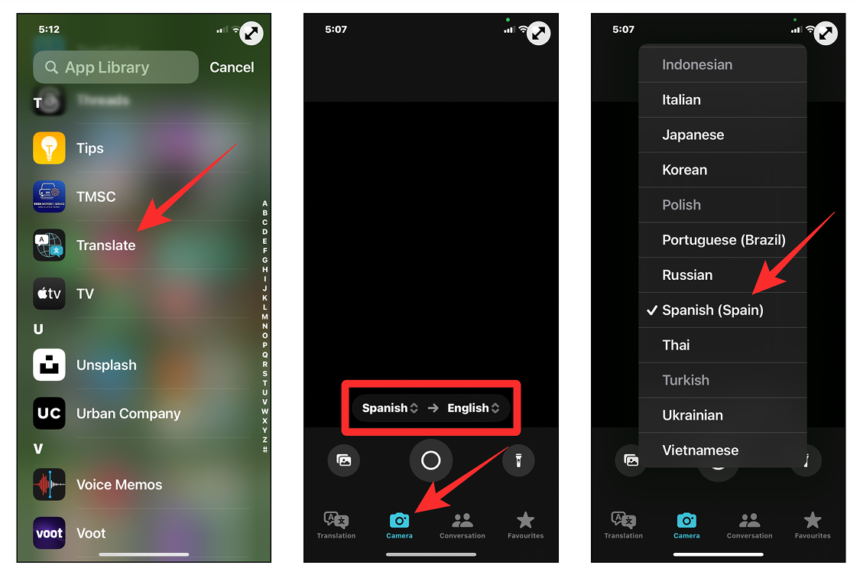
If you prefer a larger, full‑screen translation experience, you can use the Translate app directly. Open Translate, tap Camera, then choose your source and target language. Point your rear camera at the text (for example, a restaurant menu or a museum placard), and your iPhone overlays the translation in real time as you move the camera. You can pause the view with a tap to freeze the translation, or tap the translated text to hear it spoken, copy it, or share it. The app also supports translating text in photos from your library, so you can go back to a screenshot, a receipt, or a document and get a fresh translation at any time.
In both workflows, the iPhone can detect and translate multiple languages per scene, and it caches downloaded language packs so translation works offline, which is a huge advantage when you’re abroad with spotty data.
Practical use cases and how to use them
To get the most out of translating the world with your iPhone camera, it helps to treat it like a tool you reach for deliberately, not a party trick. Here are several concrete workflows:
- Reading foreign menus and labeling in real time
Open the Translate app, switch to Camera, choose your preferred interpreting language, and point your iPhone at the menu or product label. The camera overlays the translation; you can slightly move the phone to re‑read ingredients, prices, or disclaimers. If the camera view is too busy, take a photo first, then use the Translate app’s Camera → Photo path to zoom in on specific sections. - Navigating streets and signs while traveling
Use the Camera app with Live Text enabled. When you see a sign, tap the text‑selection icon and choose Translate. The system can translate directions, street names, or warnings so you can quickly decide where to turn, which bus line to take, or which door leads to the restroom. If you’re commuting, you can even hold your phone up to a train schedule or departure board and read the translated version without opening any app. - Translating text in photos, screenshots, and documents
Open any photo that contains text, tap the Live Text bubble, then tap Translate. This works for screenshots of web pages, emails, PDFs, scanned receipts, or whiteboards. The iPhone can copy the text, read it aloud, and translate it, which is useful when you receive a foreign‑language invoice or contract and need a quick gist before deeper analysis. - Translating text in third‑party apps
Many apps that show images or web pages support the same Live Text and Translate features. In Safari, Messages, Mail, or a PDF viewer, you can tap the text‑selection icon, then choose Translate and pick your target language. For text in another app, you can also use the Control Center button added in iOS 16, which lets you translate selected text in almost any app with a single tap, using the camera or Live Text depending on context.
To enable this fully, make sure Live Text is turned on in Settings → General → Language & Region → Live Text and that you’ve downloaded your preferred language packs for offline translation.
The real downsides and limitations
iPhone camera‑based translation is impressive, but it is not perfect. The accuracy depends heavily on:
- Camera quality and lighting
Low‑light, motion blur, or extreme angles can make text recognition harder, resulting in incomplete or garbled translations. You may need to pause the camera, stabilize your hand, or move closer to the text. - Handwriting and stylized fonts
Live Text works best with printed, high‑contrast, upright text. Handwriting, highly stylized fonts, or low‑contrast text on busy backgrounds may not be recognized, or only partially recognized. In those cases, the system might translate a few words and ignore the rest, leading to confusing results. - Language support and offline mode
Camera‑based translation only supports a subset of Apple’s overall language catalog, and some less common languages require a network connection or bigger language packs. If you’re traveling somewhere with very rare languages, the iPhone may not have a tuned model for them, and you might need to fall back to the traditional “copy‑paste” workflow in a browser or another app.
Additionally, Apple’s built‑in tools are still behind some third‑party translation apps in terms of nuance, context‑aware phrasing, and support for niche languages. However, for everyday use—menus, signs, short passages, and simple instructions—they are more than good enough.
The bottom line
Translating the world with your iPhone camera is one of the most genuinely useful AI‑assisted features on modern iOS devices. By combining Live Text and the Translate app, Apple gives you a frictionless way to read foreign text in real time, without leaving the camera or opening a separate app. For travelers, remote workers, and anyone who regularly encounters printed text in another language, it’s worth learning the two‑tap workflow: point the camera, tap the text‑selection bubble, and hit Translate. Over time, that small habit can make navigating a new city, reading a foreign document, or understanding a product label almost as easy as reading in your native tongue. If you want to feel more at home in a multilingual world, start using your iPhone camera as a literal translator—it’s already installed, it’s free, and it’s ready to work.