For most people, calendar apps have quietly turned into productivity dashboards. They send notifications, sync across devices, integrate with email, and promise to “optimize” every minute of your day. Yet despite all this power, many users still feel overwhelmed, disorganized, or oddly constrained by them.
There’s a quieter alternative that’s easy to overlook: a simple text document used as a calendar.
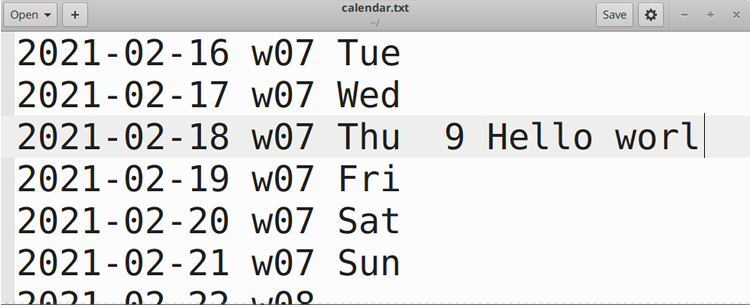
Whether it lives in Google Docs, Word, Notion, Obsidian, or even a plain `.txt` file, a text document can often replace a calendar app for personal planning, routines, and high‑level scheduling. It’s not for everyone and not for every use case, but for many workflows, it can be surprisingly effective.
In this article, we’ll look at why a basic document sometimes works better than a specialized app, which types of planning it suits, and how to structure your own “doc calendar” so it’s actually usable.
Why a Text Document Can Compete With Calendar Apps
Modern calendar apps are optimized for appointments: fixed times, fixed dates, shared participants. But not all life fits into time blocks. A lot of what we try to manage is flexible, ongoing, or conceptual. This is where a document gains an advantage.
A text-based calendar offers several strengths:
- Freedom of structure
A document doesn’t force you into daily or hourly grids. You can mix dates with notes, goals, checklists, reflections, and links in one place. For things like planning a project, tracking habits, or structuring your week, raw text is often more natural than dragging blocks across a calendar grid. - Low friction and high speed
Typing is usually faster than clicking through menus, creating events, adding descriptions, and choosing categories. In a document, you can dump everything in a single pass: dates, tasks, ideas. For many people, this speed is what keeps them consistently using the system. - Better context per “event”
A calendar event typically holds a title, time, and maybe a short description. A document lets you attach as much context as you want: why you’re doing something, what you need to prepare, links, previous notes, decisions, and summaries. This is valuable for recurring projects, learning plans, or long‑term goals where context matters more than an exact start time. - No lock‑in and no learning curve
Text is universal. You can open it on almost any device, move it between apps, and back it up easily. If a document‑based calendar stops working for you, you still have a readable file with all your plans and history. There’s no special interface to learn and no risk that switching tools makes your old data useless. - Flexibility across time scales
Calendar apps are good at days and weeks. A document can zoom effortlessly between a single day and an entire year. You can keep yearly goals, quarterly plans, weekly outlines, and daily notes in one file or a small set of files, connected by headings and internal links.
When a Simple Doc Is Better Than a Calendar App
A document calendar is not meant to replace all scheduling. It excels in specific scenarios and complements traditional calendars in others.
Here are situations where a text document often works better:
- Weekly and monthly planning
If you think in weeks instead of hours, a document lets you sketch your week as a list of priorities rather than a grid of time slots. You can define a “theme” for the week, track what matters, and adjust as you go without juggling individual events. - Habit and routine tracking
Habits don’t always need timestamps; they need visibility. A simple table or checklist per week or month in a document can be easier to maintain and review than dedicated habit apps with complex analytics. - Project timelines
For projects, the important question is often “What happens in which phase?” rather than “What happens at 15:30 on Tuesday?” Using headings by week or milestone in a document can better reflect how real work progresses. - Personal journaling plus planning
Many people want their calendar history and reflections in one place. A document allows you to mix planning with a short note about how the day went, what worked, and what to change. Calendar apps rarely support this well. - High‑level annual or quarterly views
Long‑range planning (like 12‑month goals, travel plans, or big financial milestones) is often easier to visualize as a list with dates than as tiny event dots in a compressed calendar view.
On the other hand, a traditional calendar is still essential for:
- Hard appointments with other people (meetings, calls, travel times)
- Time‑sensitive reminders (deadlines, due dates, appointments)
- Shared schedules across a team or family
In practice, many people end up with a hybrid: a document for planning and context, and a calendar app for anything that absolutely must happen at a specific time.
How to Structure a Text Document as a Calendar
A document can quickly become messy if it’s not structured. The goal is to keep it simple but predictable so you always know where to look.
Here is one straightforward approach that works well for a single file per year or per quarter.
1. Start With a Yearly Overview
At the top of your document, create a simple yearly outline. This can be as minimal as:
- January – main goals, expected events
- February – focus areas
- March – key deadlines
Each month gets a short description: big projects, trips, or financial milestones. This gives you a one‑screen summary of the year.
You can also add internal links (if your editor supports them) from each month in the overview to its detailed section below.
2. Add Monthly Sections
Below the yearly overview, create headings for each month, in chronological order. Under each month, you can set up:
- A short summary of goals or focus areas
- A list of fixed commitments (major events, deadlines)
- A space for notes or decisions
This is like a “landing page” for each month where you see what matters most.
3. Break Down Into Weekly Blocks
Inside each month, add weekly subsections. For example:
- Week 1: dates and priorities
- Week 2: dates and key tasks
Each week can have:
- 3–5 main priorities
- Supporting tasks or notes
- Any relevant links or references
If you prefer more detail, you can add daily lines under each week, but often weekly blocks are enough.
4. Use Simple, Consistent Markup
You don’t need complex formatting or color coding. Instead, choose a minimal, consistent notation, such as:
- `#` or heading levels for months and weeks
- Dashes or bullets for tasks
- A symbol like `*` or `!` for important items
- A short tag like `[done]`, `[move]`, or `[cancelled]` at the end of a line when you update it
The key is that you can scan and understand your own system instantly.
5. Keep a Running “Today” or “This Week” Section
To avoid scrolling, many users keep a small “Current Week” or “Today” section near the top of the doc. At the end of each week, you move or rewrite the next week’s plan into that section.
This gives you a dashboard you see first, while the full historical record stays below.
Advantages for Focus and Mental Clarity
A text document calendar is not just a different interface; it can change how you think about time.
Because it emphasizes lists, notes, and goals instead of blocks of time, it naturally shifts your attention from “Where can I fit this?” to “What actually matters this week?” That alone can reduce the feeling of being constantly busy but never progressing.
It can also reduce notification fatigue. The document waits for you. You open it on your terms. There are no pop‑ups demanding an immediate reaction. For many people, this quieter relationship with their schedule is a large part of why they stick with a document system.
Limitations You Should Be Aware Of
A fair assessment needs to include what a document calendar doesn’t do well.
- It does not send notifications or alarms. If you rely heavily on alerts, you may still need a simple calendar app or reminder tool for critical items.
- It is manual. You must actually open it, review it, and update it. The system only works as well as your habits.
- It may not scale for complex shared schedules. For teams, families, or organizations with many moving parts, shared calendars remain the practical choice.
- It requires occasional cleanup. Without periodic pruning or re‑structuring, a large document can become cluttered and harder to scan.
Recognizing these limitations helps you decide where a document is sufficient and where you need more specialized tools.
A Practical Hybrid Approach
For many people, the best setup is a hybrid model:
- Use a simple text document as your planning environment: yearly goals, monthly focus, weekly priorities, habits, and project timelines.
- Use a calendar app as your reminder system: meetings, appointments, deadlines with specific times, and shared events.
In practice, this means you plan your week and month in the document, then transfer only the truly time‑critical items into your calendar as events or reminders. This keeps your calendar lean and your document rich with context.
Over time, you may find that most of your day‑to‑day clarity comes from the document, while the calendar is just a thin layer on top to prevent you from missing important commitments.
When a Simple Doc Really Can Replace Your App
There are cases where you can reasonably drop a dedicated calendar app entirely, especially if:
- You have relatively few fixed appointments
- Your work is project‑based and flexible in timing
- You prefer to review your schedule consciously rather than react to notifications
- You already spend most of your planning time in documents or notes
In such situations, the simplicity of a text file—portable, searchable, easy to back up—can be a long‑term advantage. Instead of adapting to the structure of an app, you design a structure that fits how you actually think.
Final Thoughts
Calendar apps are excellent for what they were built for: tracking fixed events across time. But not all planning looks like a series of appointments. Much of life is made of priorities, projects, and habits that don’t fit cleanly into time slots.
A simple text document, used as a calendar, gives you a flexible canvas for that part of your life. It trades automation for clarity, notifications for intentional review, and rigid grids for adaptable structure.
You don’t have to choose one or the other. But exploring a document‑based calendar for a few weeks can reveal how much of your planning really needs an app—and how much is better served by nothing more than a thoughtfully structured page of text.