Every morning looked the same.
7:30 AM: Wake up. Open MacBook.
7:35 AM: Launch Slack. Launch Chrome. Launch Notion. Launch Figma. Launch VS Code.
7:40 AM: Connect to company VPN. Mount network drive. Open Dropbox folder.
7:45 AM: Wait for everything to load while sipping coffee.
8:00 AM: Finally ready to work. Spent 25 minutes just getting my computer ready.
This happened every single day. 5 days a week. 260 times a year. That’s 108 hours annually spent launching the exact same apps in the exact same order.
Then at 6 PM: Close everything. Disconnect VPN. Eject drives. Shut down.
I wasn’t alone. Most remote workers and office professionals repeat this ritual. We accept it as part of the job.
But what if the computer could do it?
That’s when I found Task Till Dawn—a free automation tool that runs on Windows and macOS. No coding required. Just drag-and-drop workflows.
I tested it. And honestly? It changed my setup more than I expected.
What Task Till Dawn Actually Is
Task Till Dawn is a free desktop automation app. It lets you build workflows that run automatically on your computer—either on a schedule or triggered by events (startup, login, file changes, USB drive plugged in, etc.).
Here’s what makes it different from other automation tools:
Traditional automation (like scripts, AppleScript, PowerShell) requires coding knowledge. You write code, test it, debug it. High barrier to entry.
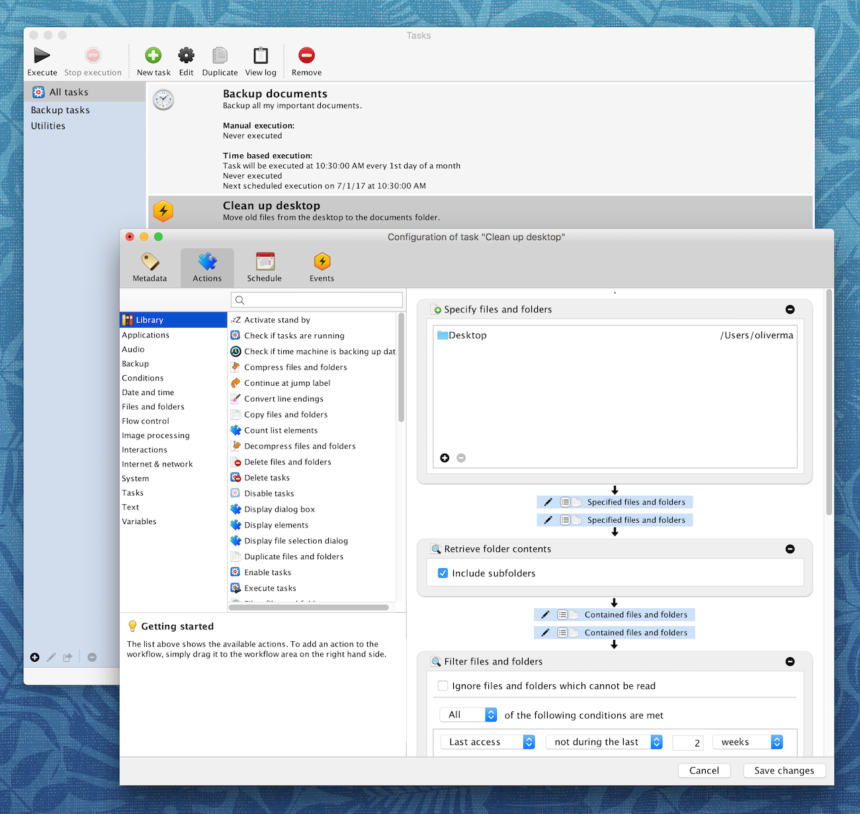
Task Till Dawn uses a visual, drag-and-drop interface. You pick actions from a menu (launch app, copy file, show notification) and chain them together. No coding needed.
Compared to paid alternatives:
- Keyboard Maestro ($36 one-time, macOS only): More powerful, but steeper learning curve
- Hazel ($49 one-time, macOS only): Focused on file organization, not general automation
- Zapier ($20–$2,500/month): Cloud-based, requires internet, for app-to-app workflows
- Microsoft Power Automate ($15/user/month): Enterprise-focused, complex
Task Till Dawn: Free. Works on Mac and Windows. Simple interface. Desktop-based (no internet required). Perfect for personal workflows.
How Task Till Dawn Works (The Basics)
The interface is simple: Create → Define → Schedule → Run
Step 1: Create a New Task
You open Task Till Dawn and click “New Task.” You give it a name (“Morning Setup” or “End of Day Cleanup”).
Step 2: Define Your Actions
You drag actions into your workflow. Common actions include:
- Launch app: Opens Chrome, Slack, Figma, etc.
- Copy file: Copies files from one folder to another
- Run script: Executes a command-line script
- Mount drive: Connects to a network drive
- Show notification: Displays an alert on screen
- Open URL: Launches a URL in your default browser
- Eject drive: Safely ejects a USB or network drive
- Wait: Pauses for X seconds between actions
- Quit app: Closes applications
You chain these together visually. For example:
[Launch Slack] → [Wait 2 seconds] → [Launch Chrome]
→ [Wait 3 seconds] → [Launch Notion] → [Show notification: "Setup complete"]Step 3: Set When It Runs
You define the trigger:
- Time-based: Run at 7:30 AM every weekday
- Event-based: Run on login, on startup, when a folder changes, when a USB drive is plugged in
- Repeated: Every 2 hours, every 10 minutes, etc.
Step 4: Enable and Forget
You enable the task. Task Till Dawn runs in the background (menu bar on Mac, system tray on Windows). When the trigger happens, the task runs automatically.
That’s it. No coding. No complexity.
My Actual Automations (What I Built)
I created 5 main workflows. Here’s what each one does:
Workflow 1: Morning Setup (7:30 AM, Weekdays Only)
Actions:
- Launch Slack
- Wait 2 seconds
- Launch Google Chrome
- Wait 3 seconds
- Launch Notion
- Wait 3 seconds
- Launch VS Code
- Connect to company VPN (via script)
- Mount network drive
- Show notification: “Work setup complete!”
Result: Every weekday at 7:30 AM, my computer automatically opens my entire work stack and connects to company systems. I walk in, sit down, and everything is ready.
Time saved: 25 minutes/day × 5 days × 50 weeks = 104 hours/year
Workflow 2: End of Day Cleanup (6:00 PM)
Actions:
- Eject network drive
- Disconnect VPN (via script)
- Quit Slack
- Quit Chrome
- Quit Notion
- Quit VS Code
- Empty trash
- Show notification: “Workday complete!”
Result: At 6 PM, everything shuts down automatically. Files are saved (I get a 5-minute warning before it runs). Drives are safely ejected.
Time saved: 5 minutes/day × 5 days × 50 weeks = 21 hours/year
Workflow 3: Backup on Login
Trigger: When I log in
Actions:
- Wait 5 seconds (let system settle)
- Copy ~/Documents → External Drive/Backups
- Copy ~/Desktop → External Drive/Backups
- Show notification: “Backup complete”
Result: Every time I log in, critical folders auto-backup. I never manually drag files around.
Time saved: 2 minutes/day × 250 work days = 8 hours/year
Workflow 4: Sort Downloads Folder (Every 4 Hours)
Trigger: Every 4 hours during work hours
Actions:
- Check Downloads folder for .pdf files
- If found, copy to ~/Documents/PDFs
- Check Downloads for images (.jpg, .png)
- If found, copy to ~/Pictures/WebImages
- Check Downloads for .zip files
- If found, copy to ~/Documents/Archives
Result: My Downloads folder never gets cluttered. Files auto-sort to their proper locations.
Time saved: 10 minutes/week (manual sorting) = 8 hours/year
Workflow 5: Weekly Cleanup (Sunday 10:00 PM)
Trigger: Every Sunday at 10:00 PM
Actions:
- Empty trash
- Clear browser cache (Chrome)
- Delete temporary files (/tmp)
- Show system notification: “Weekly cleanup done”
Result: Every week, my system gets cleaned up automatically. No manual cleanup needed.
Time saved: 15 minutes/week = 13 hours/year
The Setup Process (It’s Genuinely Simple)
Total setup time: 3 hours (including learning the interface and building 5 workflows)
Step-by-step:
Phase 1: Download and Install (10 minutes)
- Go to oliver-matuschin.de (creator’s website)
- Download Task Till Dawn for Mac or Windows
- Install it (drag to Applications folder on Mac, or run installer on Windows)
- Launch it
That’s it. No registration, no account, no setup wizard.
Phase 2: Create Your First Workflow (20 minutes)
- Click “New Task”
- Name it (“Morning Setup”)
- Drag actions from the left panel into your workflow
- Configure each action (which app to launch, which folder to copy, etc.)
- Set the schedule (daily at 7:30 AM)
- Click “Save”
Phase 3: Test It (10 minutes)
- Click “Run Now” to test the workflow
- Watch it execute
- Fix any issues (wrong app, missing folders, etc.)
- Test again until it works perfectly
Phase 4: Enable and Monitor (5 minutes)
- Check the “Enabled” checkbox
- Task Till Dawn will now run this workflow automatically
- Monitor Task Till Dawn’s log to see when tasks run
Phases 5–7: Build More Workflows (2+ hours)
Repeat for each workflow you want to create. Second workflow takes 30 minutes (you know the interface now). Third takes 20 minutes. By the 5th, you’re building them in 10 minutes.
Cost Analysis: What You’re Getting vs. Paid Tools
Task Till Dawn: $0
- One-time download
- Free forever
- No ads, no tracking, no account needed
- Works on Mac and Windows
- Supports 100+ actions
Keyboard Maestro (macOS only): $36 one-time
- More powerful (true scripting)
- Steeper learning curve
- Larger user community
- $36 vs. free
Hazel (macOS only): $49 one-time
- Focused on file organization
- Simpler for specific use case
- Less general-purpose
- $49 vs. free
Zapier (Cloud-based): $20–$2,500/month
- App-to-app automation (Slack → Google Sheets, etc.)
- Requires internet
- Different use case (integration, not desktop automation)
- Requires subscription
Microsoft Power Automate: $15/month
- Enterprise-focused
- Complex, requires learning
- Different use case (business processes)
- Subscription
Winner: Task Till Dawn. Free, does what most people need, no subscription.
What Changed After I Set It Up
Before Task Till Dawn
- Time spent launching apps: 25 minutes/day
- Time on file organization: 10 minutes/day
- Manual backups: 2 minutes/day
- System cleanup: 15 minutes/week
- Total weekly time: 3 hours 50 minutes
After Task Till Dawn
- Time launching apps: 0 minutes (automated)
- Time organizing files: 0 minutes (automated)
- Time backing up: 0 minutes (automated)
- System cleanup: 0 minutes (automated)
- Total weekly time: 5 minutes (occasional monitoring)
Weekly time saved: 3 hours 45 minutes
Annual time saved: 195 hours
At $25/hour (my free time value), that’s $4,875/year of reclaimed time.
The Honest Limitations (What Task Till Dawn Can’t Do)
Task Till Dawn is powerful, but it’s not unlimited. Here are the constraints:
1. Limited to Local Actions
Task Till Dawn only controls your computer. It can’t:
- Send emails (without a script)
- Post to social media
- Update spreadsheets
- Send Slack messages (without webhook scripting)
Workaround: For these, use Zapier or IFTTT instead.
2. No User Interface Building
You can show notifications, but you can’t build interactive prompts or forms.
Workaround: Use AppleScript or shell scripts for more complex interactions.
3. Requires Task Till Dawn to Be Running
If you restart your computer and Task Till Dawn doesn’t launch automatically, tasks won’t run.
Workaround: Add Task Till Dawn to your startup apps (automatic on most systems).
4. Limited Built-In Actions
Task Till Dawn has 100+ actions, but some specific apps don’t have native integrations. You’d need to script them.
Workaround: Learn basic scripting (AppleScript on Mac, PowerShell on Windows).
5. macOS and Windows Have Slight Differences
Some actions work differently on Mac vs. Windows. Not all actions are available on both.
Workaround: Test your workflows on both platforms before relying on them.
Real Use Cases: How Others Use Task Till Dawn
Case Study 1: The Freelancer (File Organization)
Situation: Receives client files daily, needs to organize them by project.
Workflow:
- Every 2 hours, check Downloads folder
- Sort PDFs by client name (reads filename)
- Move to ~/Clients/[ClientName]/Deliverables
- Rename files with date
- Alert freelancer: “Files organized”
Result:
- No manual file organization
- Perfect naming convention
- Always knows where client files are
- Saves 3 hours/week
Quote: “Task Till Dawn eliminated file chaos. I now have perfect organization without lifting a finger.”
Case Study 2: The Content Creator (Backup Automation)
Situation: Creates videos daily, needs to back up project files instantly.
Workflow:
- Every 30 minutes (during work hours), backup final video edits
- Copy from ~/Documents/VideoProjects → External SSD
- Copy to cloud storage (Google Drive via script)
- Show notification: “Backup complete”
Result:
- Never loses work to hard drive failure
- Always has redundant backups
- No manual backup management
- Complete peace of mind
Quote: “Before Task Till Dawn, I’d lose hours to backup nightmares. Now it’s invisible. I don’t think about it.”
Case Study 3: The Developer (Environment Setup)
Situation: Works on multiple projects, each needs different services running (database, API, frontend).
Workflow – “Project A Setup”:
- Launch Terminal
- Run Docker containers (via script)
- Launch VS Code
- Open project folder
- Open browser to localhost:3000
- Show notification: “Project A environment ready”
Workflow – “Project A Cleanup”:
- Stop Docker containers
- Quit VS Code
- Quit Terminal
Result:
- No time spent on environment setup
- Consistent setup every time
- Reduces context-switching time
- Faster context-switching between projects
Quote: “This tool saves me 15 minutes per project switch. That’s an hour per day across projects. Best free software I’ve found.”
Comparison: Task Till Dawn vs. Alternatives
| Feature | Task Till Dawn | Keyboard Maestro | Hazel | Zapier |
|---|---|---|---|---|
| Price | Free | $36 one-time | $49 one-time | $20–$2,500/mo |
| Desktop automation | ✅ Yes | ✅ Yes | ✅ Yes | ❌ No (cloud) |
| File organization | ✅ Yes | ✅ Yes | ✅✅ Specialty | ❌ Limited |
| App launching | ✅ Yes | ✅ Yes | ❌ Limited | ❌ No |
| Scripting support | ✅ Basic | ✅✅ Advanced | ✅ Yes | ✅ Yes |
| Visual editor | ✅ Yes | ❌ No (script-based) | ✅ Yes | ✅ Yes |
| Learning curve | Easy | Hard | Easy | Medium |
| macOS support | ✅ Yes | ✅ Yes | ✅ Yes | ✅ Yes |
| Windows support | ✅ Yes | ❌ No | ❌ No | ✅ Yes |
| Community | Small | Large | Medium | Large |
| Best for | General automation | Power users | File sorting | App integration |
Winner for most people: Task Till Dawn (free, simple, cross-platform)
Winner for power users: Keyboard Maestro (more features, Mac only)
Winner for file organization: Hazel (specialized, excellent at this)
Winner for app integration: Zapier (connects apps, cloud-based)
How to Get Started (30-Minute Quick Start)
Step 1: Download (5 minutes)
- Visit oliver-matuschin.de
- Download Task Till Dawn for your OS
- Install it
- Launch it
Step 2: Create Your First Workflow (15 minutes)
- Click “New Task”
- Name it “Test Automation”
- Drag “Show Notification” action into the workflow
- Type “Hello from Task Till Dawn!”
- Set schedule: “Every 5 minutes”
- Click “Save”
- Enable the task
- Wait 5 minutes and watch the notification pop up
Step 3: Build Something Real (10 minutes)
- Create a new task: “My Morning Setup”
- Drag “Launch app” → Choose Chrome
- Drag “Wait” → Set to 2 seconds
- Drag “Launch app” → Choose Slack
- Set schedule: “Daily at 7:00 AM”
- Save and enable
Step 4: Expand (Ongoing)
Once you have one workflow, build more. Each one takes 5–15 minutes depending on complexity.
The Advanced Stuff (Scripts and Webhooks)
If you want to go beyond the visual interface, Task Till Dawn supports scripting:
AppleScript (macOS)
on run
  tell application "System Events"
    display notification "Task automated!" with title "Success"
  end tell
end runYou can insert scripts into your workflows for advanced actions (send emails, manipulate data, complex file operations).
PowerShell (Windows)
# Mount network drive
  net use Z: \\server\share /persistent:yes
# Copy files
Copy-Item -Path "C:\Source" -Destination "Z:\Backup" -RecurseTask Till Dawn runs these scripts within your workflows.
This is where power users extend Task Till Dawn’s capabilities. For most people, the visual interface is sufficient.
Security & Privacy Considerations
Good news: Task Till Dawn is secure.
- No internet required (runs offline)
- No data collection (creator is a single developer, not a corporation)
- Open-source philosophy (transparent code)
- No ads, no tracking, no accounts
What to watch:
- Scripts can be dangerous: If you copy/paste a script online, verify it first. Scripts run with your system privileges.
- File paths should be specific: Be careful with automation that moves or deletes files. Test thoroughly before running.
- Scheduled tasks can surprise you: If you forget you have automation running, unexpected behavior can be confusing. Check your logs.
Best practice: Review Task Till Dawn’s logs regularly to see what it’s doing.
My Honest Recommendation
Use Task Till Dawn if:
✅ You repeat the same computer tasks daily
✅ You want to save time without coding
✅ You want a free solution
✅ You’re on Mac or Windows
✅ You need simple automation (launching apps, file organization, backups)
✅ You want set-and-forget routines
Skip Task Till Dawn if:
❌ You need app-to-app integration (use Zapier instead)
❌ You only automate once per week
❌ You need professional technical support
❌ You work in regulated industries with strict audit requirements
❌ You’re only focused on file organization (Hazel might be better)
Bottom line: If you’ve ever thought “I do this same thing every day,” Task Till Dawn is the answer.
The Bigger Picture: Automation is Underrated
Here’s what surprised me most: most people don’t automate, even though they could.
We accept repetitive tasks as inevitable. We don’t think about automation because it seems complicated or reserved for “technical people.”
Task Till Dawn proved that automation is accessible. You don’t need to code. You don’t need to be technical. You just need to spend 30 minutes setting up workflows once, and then those workflows work for years.
That’s leverage. You do the work once, and your computer does it thousands of times.
The question isn’t “Can I automate this?” It’s “Why haven’t I automated this already?”