Unlike aggressive break reminder tools that hijack your screen or traditional time trackers that demand constant start/stop micromanagement, Pandan’s entire philosophy is: stay out of the way, but keep you honest about your time.
What Pandan Actually Does (and What It Doesn’t)
Pandan describes itself as a time awareness tool, not a traditional time tracker or Pomodoro timer.
At its core, it does three things:
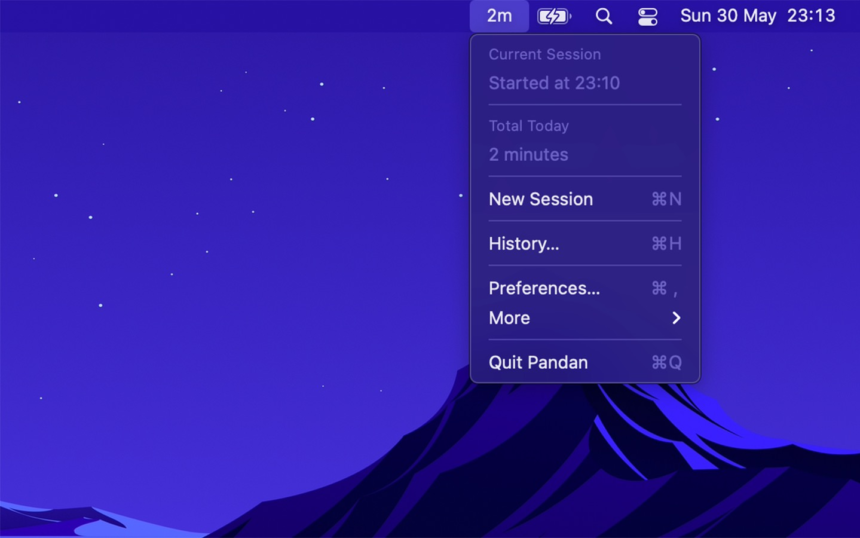
- Sits in your macOS menu bar and shows a running timer for your current “session” of active Mac use.
- Automatically pauses when you step away from the keyboard (no mouse/keyboard activity) and resumes when you return.
- Optionally shows gentle reminders at a chosen interval (for breaks, eye‑care, or focus blocks).
What it does not do:
- No complex project/task breakdowns
- No detailed per‑app analytics or category charts
- No invoicing, billing, or export reports
- No cross‑device sync (Mac only)
If you think of RescueTime/Rize/Timing as full analytics platforms, Pandan sits at the opposite end of the spectrum: a single number in your menu bar that answers “How long have I been at this?”
Why a Simple “Time Since I Sat Down” Timer Is So Useful
It’s easy to underestimate how much a glanceable timer can change your behavior.
1. Combat time blindness and overwork
People with ADHD or general time blindness often struggle to feel the passage of time while focused. Multiple reviewers explicitly mention that pairing Pandan with a day‑progress indicator completely changed how they perceive their workday.
Instead of abstractly “working for a while,” you see:
- 0:42 — “Just getting started”
- 1:37 — “Probably time to stand up or refill water”
- 3:05 — “That’s a full deep work block, I should switch tasks or take a real break”
That awareness alone prevents unintentional 5‑hour marathons.
2. Stop “just one more thing” creep
Because Pandan’s timer resets after inactivity, it maps very naturally to sessions:
- Sit down → timer starts counting up
- Walk away long enough → session ends; next time you return, a new one begins
This mirrors how you actually experience work: in blocks, not in abstract calendar entries.
3. Health and eye‑care (20–20–20 rule)
Several users use Pandan specifically for applying the 20–20–20 rule: every 20 minutes, look at something 20 feet away for 20 seconds to reduce eye strain.
Because Pandan can show subtle, non‑intrusive reminders (like a brief icon/notification you don’t have to dismiss), it’s much less annoying than apps that lock your screen with full‑screen pop‑ups.
How Pandan Tracks Your Mac Usage
Under the hood, Pandan watches for mouse movement and keyboard activity. When it detects input, it assumes you’re actively using the Mac and keeps the timer running; after a period of inactivity, it pauses automatically.
Key implications:
- No manual toggling — you don’t have to remember to hit “Start” or “Stop” when you begin or end work.
- Idle time is ignored — if you leave YouTube playing while you cook dinner, Pandan eventually pauses and doesn’t count those minutes as active time.
- Per‑session view — each active streak is one “session,” which you can see in Pandan’s history.
If you need highly granular analytics (per app, per website, categories), Apple’s Screen Time or tools like Timing/Rize are better fits. Pandan intentionally avoids that scope and keeps history capped (by default limited to roughly the last 120 days) to reinforce its “right now awareness” philosophy.
Setup: From Install to First Productive Session in 2 Minutes
Pandan is distributed via the Mac App Store and is currently Mac‑only (no iOS version, because iOS doesn’t allow continuous idle‑detection in the background).
1. Install Pandan
- Open the Mac App Store
- Search for “Pandan” by Sindre Sorhus
- Click Get → Install
On launch, Pandan adds a small icon + timer to your menu bar.
2. Grant minimal permissions
Because Pandan only needs to know if you’re active or not, it doesn’t require invasive permissions (no screen recording, no keylogging, no network access for analytics).
You may see:
- Accessibility permission prompt (to detect input/idle state in some setups)
Confirm, and you’re done. There’s no account creation, no cloud login, and no data linked to your identity according to the App Store privacy listing.
3. Basic preferences worth setting
Click the menu bar icon to open Pandan’s popup. Common tweaks:
- Start at login — makes sure it’s always available after reboot
- Reminder interval (optional) — e.g., show a subtle nudge every 20, 30, or 60 minutes
- Session handling — whether you want to treat each day as one long stream of sessions or emphasize each continuous block
The defaults are intentionally minimal—most users never touch the settings again.
Real‑World Use Cases
1. Freelancers and volunteers logging hours (without full time tracking)
If you occasionally need to know, “How long did I work on this today?” but don’t want a heavy tool like Toggl or Harvest:
- Start working on Client A → glance at Pandan when you’re done (e.g., “1:42”).
- Jot that down in your invoice or notes.
- Take a real break (timer pauses).
- Next block: repeat.
Several users mention using Pandan to track volunteer hours or specific tasks where they only care about total focused time, not micro‑segmented timelines.
2. Developers, designers, writers doing deep work
Long uninterrupted focus sessions are great—until you realize you haven’t moved in 3 hours.
Pandan gives you a non‑judgmental mirror:
- If it says “0:23,” you probably don’t need a break yet.
- If it says “2:37,” that’s your cue to stretch, refill coffee, or stand up.
Unlike fixed Pomodoro intervals, it doesn’t force you into 25/5 cycles; you decide based on live feedback.
3. People with ADHD and time blindness
App Store reviews explicitly call out Pandan as a game‑changer for time visualization issues, especially when paired with other simple indicators like a day‑progress app.
Instead of abstractly “working all day,” you see:
- 3 hours of actual active Mac time before lunch
- 2 hours after
- 45 minutes of evening admin
That concrete sense of “how long things actually take” is powerful for planning and self‑regulation.
4. Eye strain and health breaks
Following your optometrist’s advice is easier if you don’t need to think about it:
- Set Pandan to gently remind you every 20 minutes.
- Use a macOS Shortcut (see below) to flash the screen or play a chime for a 20‑second eye break.
- Return when you’re ready; timer keeps you aware of total session length.
Users report using Pandan this way to manage dry eyes and maintain healthier habits during long work‑from‑home stretches.
Going Further: Using Pandan with Shortcuts for Custom Behavior
One of Pandan’s underrated strengths is its support for the Shortcuts app on macOS.
From the FAQ and documentation:
- You can set Pandan to run a specific Shortcut when showing a notification.
- That Shortcut can:
- Play a custom sound (
Play Soundaction) - Show an alert (
Show Alertaction) - Momentarily flash the screen (with a third‑party Actions app)
- Chain other shortcuts via
Run Shortcut
- Play a custom sound (
This lets you build very tailored workflows:
Example: Eye‑break macro
- In Shortcuts, create “Eye Break 20s”:
Wait– 20 secondsPlay Sound– soft chime
- In Pandan, set reminder interval to 20 minutes and select the “Eye Break 20s” shortcut.
Result: Every 20 minutes, Pandan triggers your Shortcut: brief nudge + 20‑second pause.
Example: Multi‑action focus marker
You could create a Shortcut that:
- Logs a timestamp to a notes file
- Plays a sound
- Sets Do Not Disturb for 90 minutes
Then assign that Shortcut to a Pandan reminder at 90‑minute intervals to mark long‑form focus blocks.
How Pandan Compares to Screen Time and Full Time Trackers
It’s useful to be clear where Pandan fits in the larger ecosystem.
vs. Screen Time (built into macOS)
Screen Time shows:
- Per‑app and per‑website usage
- Daily/weekly charts
- Notifications and pickup counts
- Ability to set limits and downtime
What it lacks:
- Live “session length” in your menu bar
- Simple, unobtrusive break awareness
In practice, many people use both:
- Screen Time for historical analytics
- Pandan for present‑moment awareness
vs. RescueTime, Rize, Timing, etc.
These tools:
- Classify time as “productive” vs “distracting”
- Provide detailed reports, tags, and goals
- Often sync across devices and teams
But they also:
- Cost money (subscriptions)
- Require setup, categories, and rules
- Can feel like surveillance, especially in teams
Pandan:
- Is free, Mac‑only, and local‑only.
- Shows one thing well: how long you’ve been actively using your Mac right now.
If you want analytics, get a tracker. If you want awareness, Pandan is enough.
Limitations and Trade‑offs (Deliberate by Design)
Some “missing features” are intentional decisions, according to the developer’s FAQ:
- History limited to about 120 days: Pandan is intentionally not for deep retrospective analysis. If you need multi‑year stats, use Screen Time or another tracker.
- No iCloud sync: Developer cites reliability issues and support burden; also, Pandan doesn’t need cross‑device data to do its job.
- Mac‑only: iOS doesn’t allow continuous idle detection, so a direct port is not feasible.
- No big graphs or dashboards: That’s not the app’s purpose.
These constraints keep Pandan:
- Lightweight
- Private
- Stable
- Free of configuration bloat
If you find yourself wanting complex dashboards, that’s a sign you’ve crossed from “time awareness” into “time analytics” territory.
Who Pandan Is Perfect For (and Who It’s Not)
Great fit for:
- Mac users who frequently lose track of time while working
- Developers, writers, designers doing long focus sessions
- People with ADHD or time blindness who need a simple, always‑visible time anchor
- Anyone wanting gentle eye/health break reminders without intrusive pop‑ups
- Freelancers/volunteers who occasionally need rough active time on a task, not minute‑level logs
Probably not enough for:
- Agencies needing per‑client billable hours with export/invoicing
- Teams that require centralized reporting and dashboards
- People who want to categorize time as “productive vs unproductive” automatically
- Users on Windows or Linux (Pandan is macOS only)
For those, Pandan can still be a nice personal overlay—you might use a heavy tracker professionally, and Pandan for your own awareness.
Pandan doesn’t try to be clever. It doesn’t gamify your day or shame you for losing an hour to YouTube. It simply tells you, with a glance at your menu bar, how long you’ve actually been at the keyboard and trusts you to make good decisions from there.
In an era of noisy productivity apps that demand categories, labels, and goals, that restraint is its superpower.
If you’re on a Mac and ever think “Wait, how long have I been doing this?”, install Pandan, forget about it, and let that tiny timer quietly change your relationship with time.