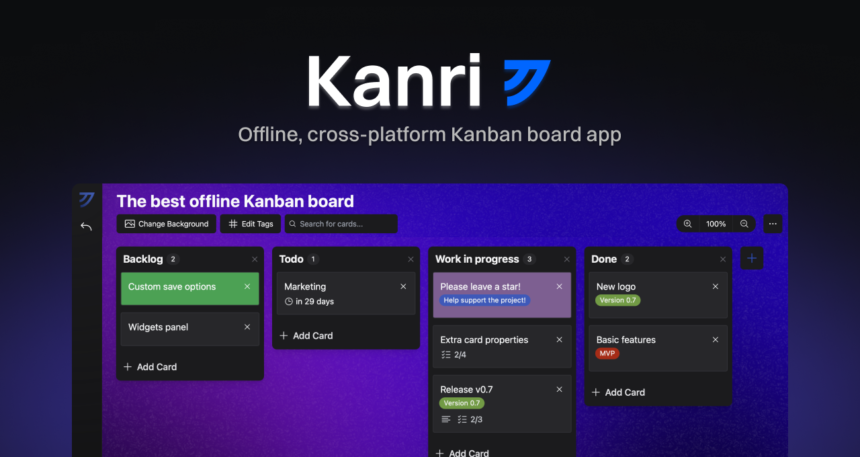
As a busy professional, you need a project management tool that keeps up with your active lifestyle. Trello is great, but what if you don’t always have internet access? That’s where Kanri comes in – a free offline alternative to Trello. You can stay on top of your tasks and projects wherever you are, without relying on a stable internet connection.
Kanri is designed to be intuitive and easy to use, making it simple to switch from Trello. You’ll appreciate the similar board-based interface and the ability to create lists, cards, and checklists. But what really sets Kanri apart is its offline capabilities – you can access and update your boards even without internet, and sync them when you’re back online.
Key Features of Kanri
Kanri offers a range of features that make it an attractive alternative to Trello. You can create boards, lists, and cards, and customize them to fit your needs. You can also add due dates, assign tasks, and track progress. Kanri’s offline mode is seamless, allowing you to work on your projects without interruption.
Getting Started with Kanri
To get started with Kanri, simply download and install the app on your device. You can then create a new board or import an existing one from Trello. Here’s a step-by-step guide to help you get started:
- Download and install Kanri on your device
- Create a new board or import an existing one from Trello
- Customize your board with lists, cards, and checklists
- Assign tasks and track progress
Benefits of Using Kanri
So why should you use Kanri instead of Trello? For one, Kanri is completely free, with no restrictions on the number of boards or cards you can create. It’s also offline-capable, making it perfect for remote work or travel. Additionally, Kanri is highly customizable, allowing you to tailor your boards to fit your specific needs. Whether you’re a freelancer, entrepreneur, or team manager, Kanri is a great choice for project management.
Tips for Making the Most of Kanri
To get the most out of Kanri, here are a few tips to keep in mind:
- Use the offline mode to stay productive on-the-go
- Customize your boards with colors, icons, and labels
- Assign tasks and due dates to team members
- Track progress and adjust your workflow as needed
Conclusion
In conclusion, Kanri is a powerful and flexible alternative to Trello that offers a range of benefits, including offline capabilities, customization options, and a free price tag. Whether you’re a busy professional or a team manager, Kanri is definitely worth checking out. With its intuitive interface and seamless offline mode, you can stay on top of your tasks and projects wherever you are.